Max Remote Full1.2.5
Publisher Description
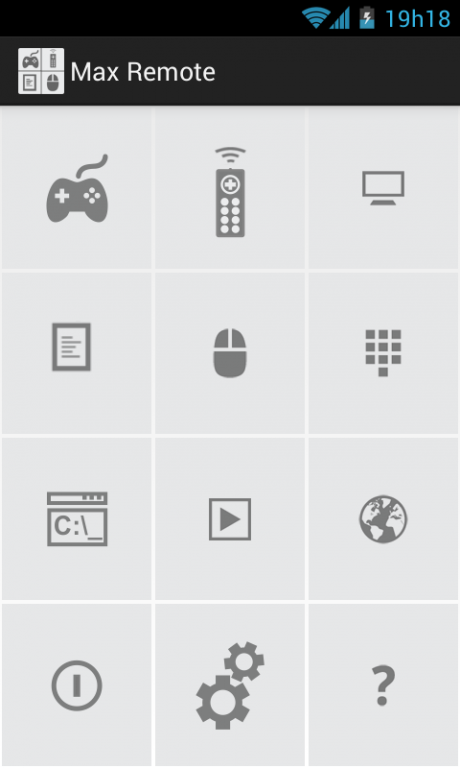
Turn your Android device into a WiFi universal remote for your computer. Control your mouse, keyboard, slide shows, video players, and your favorite games with more than 20 models of joysticks and much more all from your Android device.
DOWNLOAD SERVER
http://www.bitunitsstudio.com/max-remote-server.html
TUTORIAL
http://www.bitunitsstudio.com/tutorial
SUPPORT
http://www.bitunitsstudio.com
info@bitunitsstudio.com
FAQ
http://www.bitunitsstudio.com/faq.html
FULL VERSION
• No ads
• Create unlimited custom remotes
• Create unlimited custom joysticks
REMOTES
• Basic Input (Mouse and Keyboard)
• Browser
• VLC Player
• Media Player Classic
• Windows Media Player
• You Tube
• Slide Show
• Run
• Transfer Text (Type or speak the text)
• NumPad
• GimpPad
• CorelPad
• Power (Shutdown, restart, hibernate...)
JOYSTICKS
• NES
• SNES - Super Nintendo
• Nintendo 64
• Saturn
• Gamepad
• Gamepad 2
• Shooting Mode
• Shooting Mode 2
• Race Mode
• Race Mode 2
• NES Max Remote
• SNES Max Remote
• Nintendo 64 Max Remote
• Play Station 3 Max Remote
• Saturn Max Remote
• Gamepad Max Remote
• Shooting Mode Max Remote
• Shooting Mode 2 Max Remote
• Race Mode Max Remote
• Race Mode 2 Max Remote
* In Android 2.2 and 2.3 Joysticks only support single touch.
OTHERS FEATURES
• Speech Recognition
• Automatic server detection
• Custom Remotes (Android 2.2 and up)
• Custom Joysticks (Android 3.0 and up)
• Custom/Android keyboard support
• Single/Multi touch mouse
• WiFi (TCP/UDP)
• Max Remote also lets you open several programs remotely, including:
• Microsoft Word
• Microsoft PowerPoint
• Microsoft Excel
• Writer
• Calc
• Impress
• WordPad
• Notepad
• Google Chrome
• Mozilla Firefox
• Internet Explorer
• Opera
• Windows Media Player
• Calculator
• Command Prompt
* If you prefer you can also use the Run tool to open your favorite programs.
Special thanks to Trevyn Mace
About Max Remote Full
The company that develops Max Remote Full is Bit Units Studio. The latest version released by its developer is 1.2.5. This app was rated by 3 users of our site and has an average rating of 3.5.
To install Max Remote Full on your Android device, just click the green Continue To App button above to start the installation process. The app is listed on our website since 2015-07-18 and was downloaded 3,490 times. We have already checked if the download link is safe, however for your own protection we recommend that you scan the downloaded app with your antivirus. Your antivirus may detect the Max Remote Full as malware as malware if the download link to com.bitunitsstudio.maxremote is broken.
How to install Max Remote Full on your Android device:
- Click on the Continue To App button on our website. This will redirect you to Google Play.
- Once the Max Remote Full is shown in the Google Play listing of your Android device, you can start its download and installation. Tap on the Install button located below the search bar and to the right of the app icon.
- A pop-up window with the permissions required by Max Remote Full will be shown. Click on Accept to continue the process.
- Max Remote Full will be downloaded onto your device, displaying a progress. Once the download completes, the installation will start and you'll get a notification after the installation is finished.
Program Details
System requirements
Download information
Pricing
Version History
version 1.2.5
posted on 2015-07-18
Version 1.3,• Add support to keys +, -, * and /,Version 1.2,• Automatic server detection,• Server list,• Auto connect,• Customizable mouse refresh rate,• Fix minor bugs,Version 1.1,• Fix minor bugs,Version 1.0,• Remote editor,• Joystick editor,• New settings menu,• Fast connection(UDP) added,• Customizable mouse precision,• Customizable mouse acceleration
